Prolog electronic checklist: how to do it in the app
 Luiz Felipe 4 min read
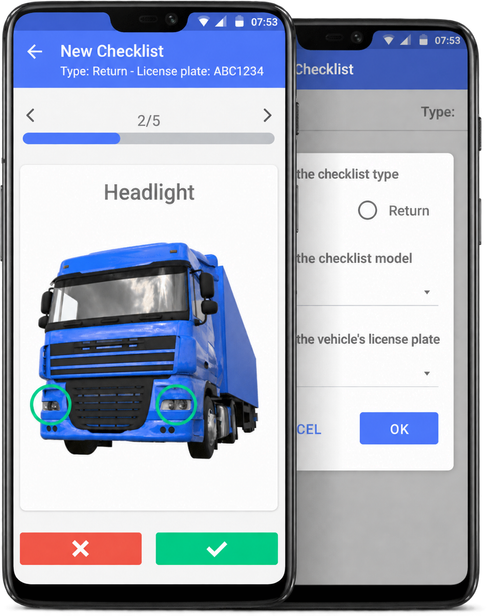
Want to make your vehicle checking process faster and more practical? With Prolog App, you can! With an electronic checklist, your maintenance will be much more efficient.
To begin, let's first recall and clarify what the electronic checklist is.
It is: a system or app for a computer, tablet or phone in which you create a checklist to carry out the preventive maintenance of a fleet's vehicles.
In other words, instead of having the traditional paper list, which makes the work slower, you can view and update all the information through the app.
Here at Prolog, we have developed a system that is highly customizable and focused on the agility of operations.
Benefits of the Prolog electronic checklist
In addition to being able to create your own questionnaires (checklists) according to the vehicle type, you can add customized images, questions and alternatives according to your needs.
Beyond bringing productivity and reducing the costs of fleet management, safety is an important factor to mention. It is not only safety for the company, but, above all, for the drivers of these vehicles.
And, likewise, for the mechanics and employees involved in preventive maintenance and in correcting problems found in each machine.
That way, the benefits are the following:
- productivity;
- visibility for the whole team;
- cost reduction;
- sustainability;
- support for preventive maintenance;
- real-time updates, recorded with each inspection;
- safety and prevention.
How the Prolog electronic checklist works
The system developed by Prolog lets you create several types of questionnaires. That is, you can have a checklist for forklifts, one for trucks, one for light vehicles, and so on.
In most cases, the driver themselves performs the checklist on the departure or arrival of a trip. During the process, they identify whether everything is fine or whether it is necessary to report an error or failure in the vehicle.
If there is a problem, they will identify what the problem is and add a photo to show what they found. This opens a work order so that those responsible for maintenance can find and resolve the problems more easily and quickly.
As soon as the check is finished, the work orders are opened immediately (in real time) and classified according to low, high or critical priority — which are already determined by alternative when the questionnaire is created.
So, if the problem is critical priority, the vehicle cannot leave on any kind of trip until the problem is corrected and the WO is closed.
How do you know which vehicles have a work order? Easy: Prolog has real-time dashboards, updated with every inspection, as well as a vehicle traffic light showing open critical WOs.
Step-by-step guide to using the Prolog checklist
First of all, you need to create the electronic checklist. If you already have a checklist you use on paper, you can just add the options in the app. However, if you do not yet know what is needed, do a little research and check your fleet's needs.
It is good to make sure it is a complete list so that the review really provides the necessary safety in transport operations.
Once you start using the system to carry out the maintenance itself, there is not much to it:
- Tap to perform a checklist.
- Confirm your identity.
- Select the questionnaire template.
- Select the license plate of the vehicle being checked.
- Choose trip departure or return.
- Start the checklist.
- Each item in the questionnaire has the option to confirm or report an issue, which will be used according to the situation.
- If everything is fine, confirm with the green button.
In general, if everything is fine, you will just press the green button to give the OK. Now, if something is wrong, you will need to report an issue.
How to report an issue in the Prolog checklist
- If you need to report an issue, tap the red button.
- Select what the issue with that item is (if it is a headlight, as in the video (which is in Portuguese), you can choose among some predefined alternatives such as burned-out bulb, broken lamp, among others)
- Tap the desired option.
- Tap to add a photo, capture the image of the issue and confirm.
- Confirm the submission and finish the checklist.
Now, all the checklist data is saved and being updated in real time! This way, any issue will generate the work order mentioned earlier so that the vehicle can be brought back into service as soon as possible.
How to get the Prolog App electronic checklist
To get the electronic checklist system we offer, just get in touch with one of our support agents. It can be through the online chat (available right here on the website, you can check it on the right side of your screen), by email on the contact page or even by phone.
In addition, during your conversation, all questions will be answered. That way, your process of acquiring the Prolog electronic checklist goes smoothly.
Do not miss this opportunity and schedule a conversation today!
Frequently asked questions
What is an electronic checklist?
How does the driver use the Prolog checklist day to day?
How do you report an issue found during the inspection?
What happens when an item fails?
Can you have a different checklist for each vehicle type?
How do you sign up for Prolog's electronic checklist?
// newsletter
Fleet management content, straight to your inbox
Articles on tires, maintenance and fleet operations. No spam.